Check sent Forms are in PebblePad
HOW TO – Check sent Forms are in PebblePad
1. Once you have sent your Forms from PebblePocket to PebblePad you can check they come through successfully by first logging into PebblePad and accessing your portfolio.
CAUTION Please be aware that in Resources, where you access your portfolio, you will also see all the worksheets for your forms. Please do not use, edit or delete these. Simply ignore them and access your portfolio. You might have to scroll down to find it.
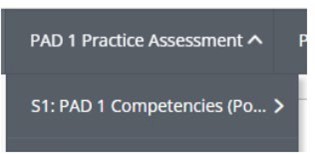
In your portfolio click onto the necessary secton. For the sake of this guidance we are using the Paramedic portfolio as an example and checking our Competency 1 form sent from PebblePocket to PebblePad, so we click PAD 1 Practice Assessment -> S1: PAD 1 Competencies (Pocket)*
*Apprenticeship students only have access to PAD 2 and 3 but the same instructions apply.
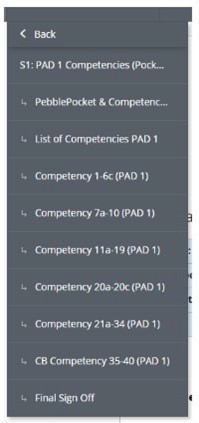
2. Click the section your competency was for. For this example click Competency 1-6c (PAD 1).
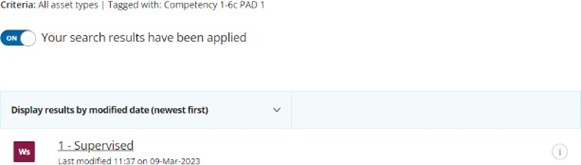
3. Ensure Search results is turned ON
Once it is, all sent competencies will now appear in a list on the page.
Note that this process will differ by course and workbook, but if you have successfully uploaded your PebblePocket forms they should appear in the correct section in your portfolio on PebblePad. If you are not sure where this is please contact LTA@hud.ac.uk for further guidance.